
Screenshots
App details
- Updated
- Apr 23, 2008
- Language
- English
- Developer
- Gordon
- Category
- Mobile
SoftPas in:
This product is also available in the following languages:
About Wii White VS
Download Wii White VS – Desktop Theme, Nintendo Wii, Windows XP, Minimalist Design, Free
Overview
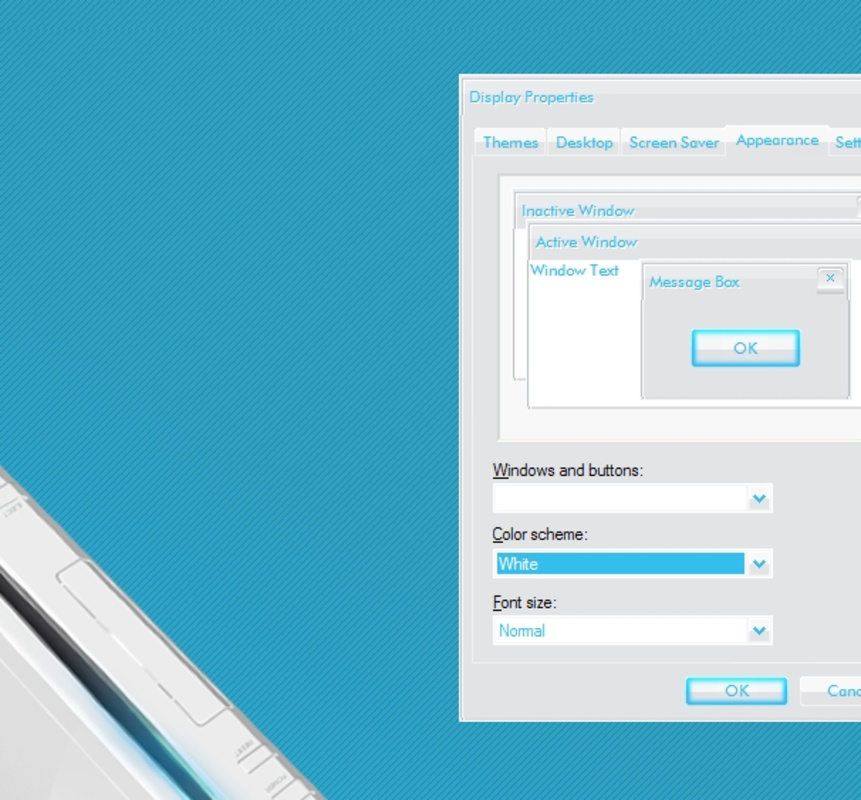
Wii White VS is a free desktop theme designed to transform the Windows XP user interface with the iconic aesthetic of the Nintendo Wii console. Tailored for fans of retro gaming and minimalist design, the theme delivers a visually calming and nostalgic computing experience. By adopting a clean layout with a soothing color scheme, it aims to reduce visual fatigue during extended computer use, making it ideal for casual users, gamers, and digital enthusiasts who appreciate thoughtful design.
The theme addresses the common desire for personalization in operating systems, particularly in older platforms like Windows XP, where customization options were limited but highly valued. It offers a way to elevate the standard desktop environment into something more engaging and expressive, without compromising functionality. Its minimalist approach aligns with modern design principles, emphasizing clarity and simplicity over clutter.
While the developer is not explicitly named in the provided information, the theme’s release in 2008 reflects a period when community-driven desktop customization was popular. It serves as a cultural artifact of that era, bridging nostalgia with usability. Real-world use cases include setting up a retro gaming station, enhancing a study or workspace with a calm visual environment, or simply enjoying a unique aesthetic that stands out from default Windows themes.
Within the broader ecosystem of desktop utilities, Wii White VS holds a niche but meaningful role. It exemplifies how small, focused tools can significantly improve user satisfaction through thoughtful design. The theme’s enduring presence underscores its appeal, even decades after its release.
Key Features & Functionality
- Sleek Minimalist Design: The theme adopts a clean, uncluttered layout inspired by the Nintendo Wii’s user interface. This design philosophy reduces visual distractions, helping users maintain focus during work or play.
- Soothing Color Palette: Dominated by whites and grays with blue accents, the color scheme is engineered for eye comfort. This makes it suitable for long-term use, especially in low-light environments.
- Custom Window Borders: Unique borders for windows, menus, and toolbars enhance visual cohesion. These refined edges contribute to a polished, professional appearance across the desktop.
- User-Friendly Navigation: The interface is designed with intuitive layout principles, ensuring that users can adapt quickly without needing technical expertise.
- Perfect for Nintendo Fans: The theme acts as a tribute to the Nintendo Wii, appealing to users who value nostalgia and emotional connection to classic gaming systems.
Each feature serves a practical purpose beyond aesthetics. For example, the minimalist layout can help improve productivity by reducing cognitive load. The soothing color palette is particularly beneficial for users who spend long hours in front of a screen. Custom window borders not only enhance visual appeal but also improve edge recognition, making it easier to distinguish active windows. For retro gaming enthusiasts, the theme creates a thematic environment that complements their setup, turning the desktop into a dedicated space for gaming nostalgia.
Interface, UX & Performance
The interface of Wii White VS is characterized by its simplicity and visual harmony. The layout follows a grid-based structure with consistent spacing, contributing to a balanced and organized desktop experience. The use of soft gradients and subtle shadows adds depth without overwhelming the user.
Navigation is intuitive, leveraging familiar Windows XP elements while reinterpreting them with the theme’s design language. Users can expect a seamless transition when switching between applications, thanks to the cohesive styling of buttons, menus, and window controls. The theme maintains compatibility with standard desktop functions, ensuring that no core features are compromised.
Although the developer did not list formal performance metrics, the theme’s lightweight nature suggests minimal impact on system resources. It is designed for Windows XP, which typically runs on older hardware, so efficiency is likely a priority. Responsiveness is expected to be stable across low- to mid-range devices, though specific benchmarks were not provided.
Stability appears to be a strength, as the theme has remained functional for over a decade. However, compatibility with modern systems is not guaranteed, and users should expect potential display issues or missing elements when applied to newer operating systems.
Platform Compatibility & Technical Requirements
Wii White VS is specifically designed for Windows XP, making it compatible with this legacy operating system. The developer did not specify minimum OS requirements beyond the platform, nor did they list exact file size or version details.
Given the release date of April 23, 2008, the theme was developed during the peak of Windows XP’s usage. It was likely optimized for systems with modest hardware specifications, typical of that era. The file size is not disclosed, but considering its nature as a desktop theme, it is expected to be small—likely under 10 MB.
Compatibility with newer versions of Windows, such as Windows 7, 8, 10, or 11, is not confirmed. Users attempting to install it on modern systems may encounter issues with theme rendering or missing components. The developer did not provide information about updates or support for future platforms.
Pros and Cons
- Free to download and use
- Minimalist design improves focus and reduces visual strain
- Thoughtful color palette enhances eye comfort
- Perfect for Nintendo Wii enthusiasts and retro gaming fans
- Lightweight with minimal system impact
- Only compatible with Windows XP
- No official updates or support since 2008
- Not optimized for modern operating systems
- Limited customization options beyond the core theme
- May not render correctly on high-resolution displays
FAQ
Is Wii White VS safe to download?
Yes, the theme is a legitimate desktop customization tool. As a free theme for Windows XP, it does not include malware or intrusive components. However, users should only download from trusted sources to avoid modified or bundled files.
Can I install Wii White VS on Windows 10 or 11?
While technically possible on some systems, compatibility is not guaranteed. The theme was designed for Windows XP and may not function properly on newer operating systems due to changes in theme architecture.
Does Wii White VS require administrative privileges to install?
Installation typically does not require admin rights, as it involves modifying user-level theme settings. However, this may vary depending on the system configuration and user permissions.
How do I uninstall Wii White VS?
To remove the theme, users can revert to the default Windows XP theme through the Display Properties settings. No additional uninstaller is required, as the theme is stored in standard system folders.
Is there a mobile version of Wii White VS?
No mobile version exists. The theme is exclusively designed for desktop use on Windows XP and is not available for Android or iOS devices.
Final Thoughts
Wii White VS stands as a testament to the power of thoughtful design in niche software. Though developed over a decade ago, its minimalist aesthetic and soothing color scheme continue to offer a refreshing alternative to default desktop interfaces. It excels as a tool for nostalgia, productivity, and visual comfort, particularly for users still running Windows XP or recreating retro gaming environments.
While its limitations in compatibility and modern support are clear, the theme remains a valuable option for those seeking a clean, focused, and emotionally resonant computing experience. For fans of the Nintendo Wii and lovers of retro design, it delivers a unique value proposition: a digital space that feels both familiar and calming.
Download Wii White VS now
Guides & Tutorials
How to install Wii White VS
- Click the Download button above.
- Once redirected, accept the terms and click Install.
- Wait for the Wii White VS download to finish on your device.
How to use Wii White VS
This software is primarily used for its core features described above. Open the app after installation to explore its capabilities.
User Reviews
No reviews yet. Be the first to share your experience.
You may also like
more
Que no te pillen¡
About !Que no te pillen¡Reviewed by Jason A. BilbreyShow MoreShow Less

3D Combat Zone
About 3D Combat ZoneOriginally released in 1983, 3D Combat Zone immerses players...

666: El día del portal
About 666: El día del portalOn June 6, 2006, Agent P. Stone uncovers a sinister...

80 in 1 Best Flash games
About 80 in 1 Best Flash games 80 in 1 Best Flash games is a collection of 80 fl...

ABYSS SEEKERーーWhat Do You See Deep in The Abyss
About ABYSS SEEKERーーWhat Do You See Deep in The AbyssIn ABYSS SEEKER, players...

ACA NEOGEO THE KING OF FIGHTERS 2002 for Windows
About ACA NEOGEO THE KING OF FIGHTERS 2002 for WindowsTHE KING OF FIGHTERS 2002,...